An AI analyst that already knows your data.
Wize is the assistant built into Rankwize — not a generic chatbot. It knows the screen you're on, reads your own citation, diagnosis, and analytics data, and answers through eight specialist modules. Ask why you're invisible on a prompt, what to fix first, or what your GSC numbers mean — and get an answer grounded in your account.
Available on Pro + Diagnose and above
It answers in the context of what you're looking at.
Wize knows which screen you're on, which tab and filters are active, and what that screen can actually do. Ask "why is this prompt invisible?" while you're looking at it, and Wize answers about that prompt — not in generic terms.
Every answer lists the data sources and the specific data it used, so you always see where a response came from.
Knows the screen
Current page, active tab, filters, and date range — folded into every answer.
Shows its sources
Each reply names what it relied on — your data, the knowledge base, the current screen.
Eight specialists, not one generalist.
Wize routes your question to the specialist modules that fit it, so answers are grounded in the right part of the platform — citations, platforms, recommendations, discovery, briefs, analytics, troubleshooting, or onboarding.
Citation Diagnosis
Why you are cited, merely mentioned, or invisible on a prompt — and how you stack up against the competitors winning it.
Platform Behavior
How each AI engine — Google AI Overviews, ChatGPT, Perplexity, Google AI Mode — generates answers, picks sources, and handles runs.
Recommendation Decisioning
What to fix first. Wize walks you through prioritizing and acting on your open recommendations.
Prompt Discovery
Which intents to activate, how the priority scores work, and how to balance your prompt budget.
Brief QA
Whether a brief is ready to hand off — quality, export readiness, and the right format for your team.
Imported Analytics
What your Google Search Console and GA4 data means in the context of AI citations.
Troubleshooting
Root-cause help when something looks off — a failed run, partial results, stale data, or a blocked action.
Onboarding
Plain-language explanations of platform concepts when you are getting started or hit something unfamiliar.
3
Pins per conversation
Pin a prompt, a recommendation, or a content page to keep it in context.
Live, not frozen
Pinned items are re-read each turn, so status and renames flow straight through.
Carries the thread
Recent conversation history travels with each question, so follow-ups land in context instead of starting over.
Pin what matters. Keep the thread.
Working through a specific recommendation or prompt? Pin it, and Wize keeps it in context for the whole conversation — re-reading its live data on every turn so you're never working from a stale snapshot.
Wize also knows when to point you to the team — if it detects you've hit a real bug, a missing capability, or you're going in circles, it surfaces a path to human help instead of guessing.
Start from a template.
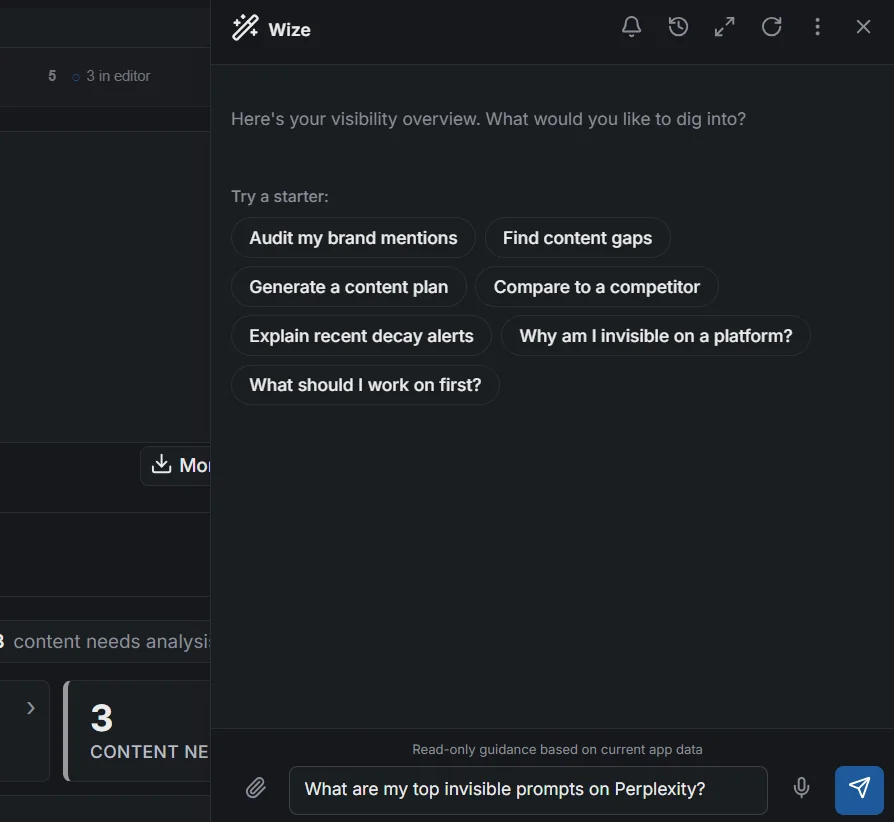
Curated conversation starters get you straight to the common jobs. Pick one and Wize tunes its answers for that task — and can auto-pin the most relevant item to start.
Answers stream in. Costs stay visible.
Wize streams its response as it's generated, so you start reading immediately instead of staring at a spinner.
It runs on AI credits, and your plan includes a monthly allowance. Every answer shows the credits it used and how many remain — no surprises. Export any conversation to Markdown to share or keep.
Streamed replies
Read as Wize writes, token by token.
Credit transparency
Per-answer cost and remaining monthly allowance, always in view.
Export to Markdown
Copy or download a full conversation, with its sources, in one click.
Open Wize. Ask in plain language.
Open Wize from any screen and it opens on your visibility overview with a set of starter prompts — or just type your own question, like "What are my top invisible prompts on Perplexity?"
Every reply is read-only guidance grounded in your current app data, so the answer is about your account — not generic advice.
How it works
Ask in context
Open Wize from any screen — or start from a template — and ask. It already knows where you are and what data is in front of you.
Get a grounded answer
Wize routes to the right specialist modules, reads your live data and any pins, and streams back an answer with its sources shown.
Act on it
Decide what to fix first, generate the brief, and ship — then let Impact Tracker measure whether it worked.
Frequently asked
What plan do I need for the Wize Assistant?
Wize is part of the Diagnose add-on — available on Pro + Diagnose and above. It is not part of the Track-only tiers.
What does "screen-aware" actually mean?
Wize knows which screen you are on, which tab and filters are active, and what data that screen shows. When you ask a question, it answers in the context of what you are looking at — not as a generic chatbot that ignores where you are in the app.
Does it just make things up?
Wize answers from your own monitoring, diagnosis, and analytics data plus a structured map of what each screen can do. Every reply shows the sources and the specific data it used, so you can see where an answer came from.
Can I keep context across a conversation?
Yes. You can pin up to three items — a prompt, a recommendation, or a content page — and Wize keeps them in context for every turn, re-reading their live data each time. It also carries recent conversation history so follow-up questions make sense.
How do templates work?
Templates are starter prompts for common jobs — auditing your brand mentions, finding content gaps, building a content plan, explaining decay alerts, and more. Picking one tunes how Wize responds for that conversation and can auto-pin the most relevant item to get you going.
How much does using Wize cost?
Wize uses AI credits, and your plan includes a monthly credit allowance. Every answer shows the credits it used and how many you have left, so usage is always transparent. You can also export any conversation as Markdown.
Wize turns your Rankwize data into answers — and diagnoses into next steps.