You decide what gets monitored. The queue makes that easy.
When Prompt Discovery finishes, mid-confidence intents don't auto-activate — they go to your Intent Review Queue. For each intent you see the query text, its four factor scores, the matched content page if one exists, and its commercial value tier. You activate, edit, or reject. Nothing you didn't approve enters monitoring.
Available on Business + Diagnose and above
What lands in the queue.
The Intent Review Queue receives intents that scored above the review floor but below the auto-activate threshold. The routing is deterministic: priority score or demand evidence above the review floor qualifies an intent for the queue.
For each queued intent you see:
- The intent text and query intent category (informational, commercial, comparative, diagnostic)
- The four independent factor scores: Demand Evidence, Citation Opportunity, Content Readiness, Commercial Value
- The business value tier: P1 (priority ≥ 70), P2 (priority 45–69), P3 (priority < 45)
- The matched content page from your library, if one exists — so you know before you activate whether you already have a page that could win this prompt
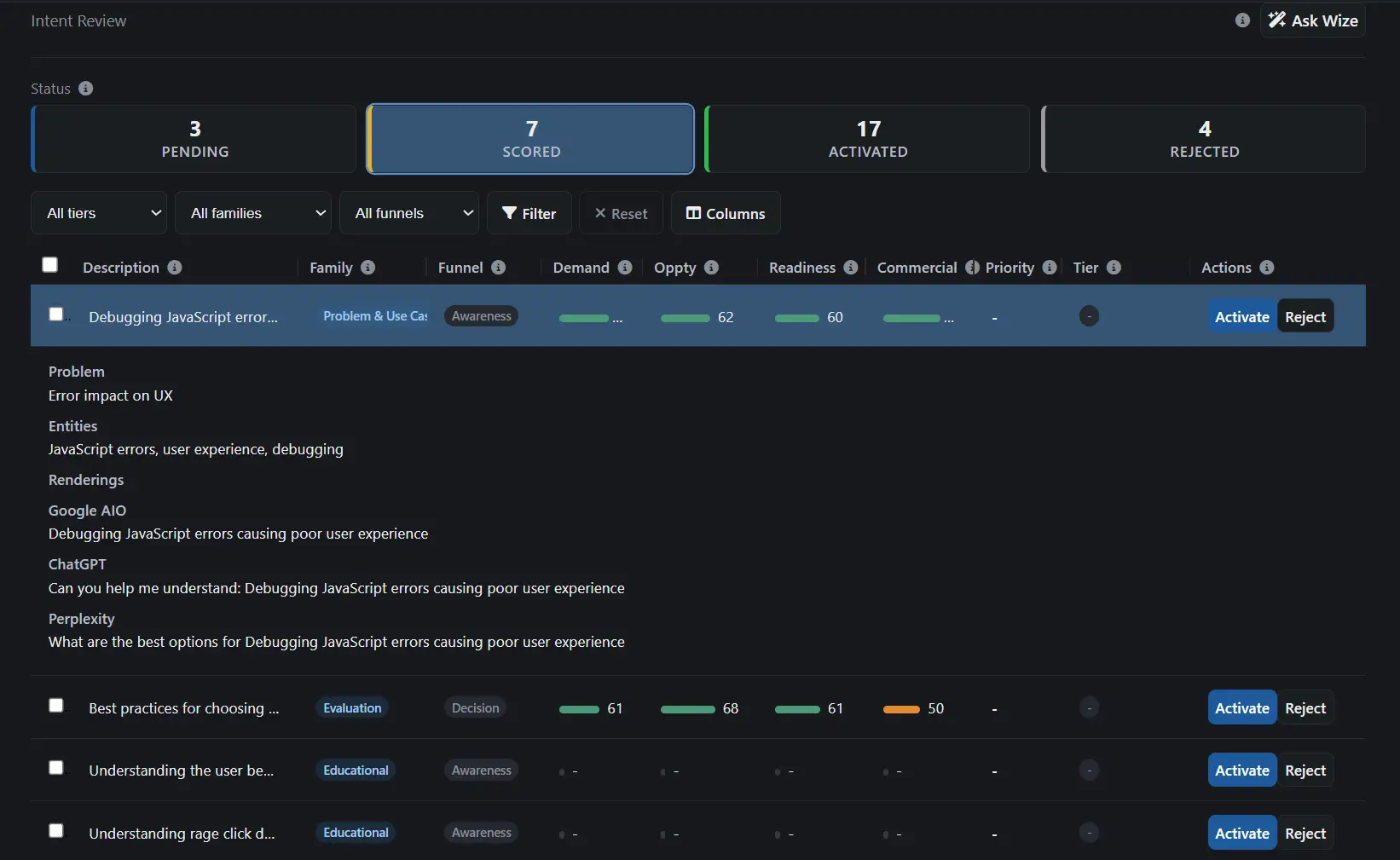
Three actions per intent.
Activate
The intent enters active monitoring. Rankwize renders platform-specific prompt text and enqueues the first monitoring run. From that point it appears in your Prompts view and runs on your monitoring cadence.
Edit, then activate
Adjust the intent text, entities, funnel stage, or other properties before activating. The edited version replaces the generated version; the original is archived. Useful when the generated intent is directionally correct but needs narrowing.
Reject
The intent is removed from the queue and archived. Rejected intents don't re-appear in future discovery cycles unless you restore them manually.
Why the queue exists.
Auto-activation handles the obvious intents — high demand, high citation opportunity, clear commercial intent. Those don't need review.
The queue is for the middle tier: prompts where the factor scores suggest value but the editorial call is yours. A competitor comparison prompt you've decided not to address. A query in a vertical you're not targeting this quarter. A lower-priority buying-stage prompt where monitoring cost isn't justified right now.
The queue gives you that call without requiring you to manage a manual import process or write prompts from scratch.
How it works
Discovery generates
Prompt Discovery scores every candidate intent and routes mid-confidence intents to the queue automatically.
You review
Factor scores, matched content page, and business value tier are visible for each intent before you decide.
You activate
Approved intents enter monitoring. Rejected intents are archived. Nothing activates without your approval.
The Intent Review Queue is part of the Prompt Discovery pipeline.