Briefs your writers can actually execute.
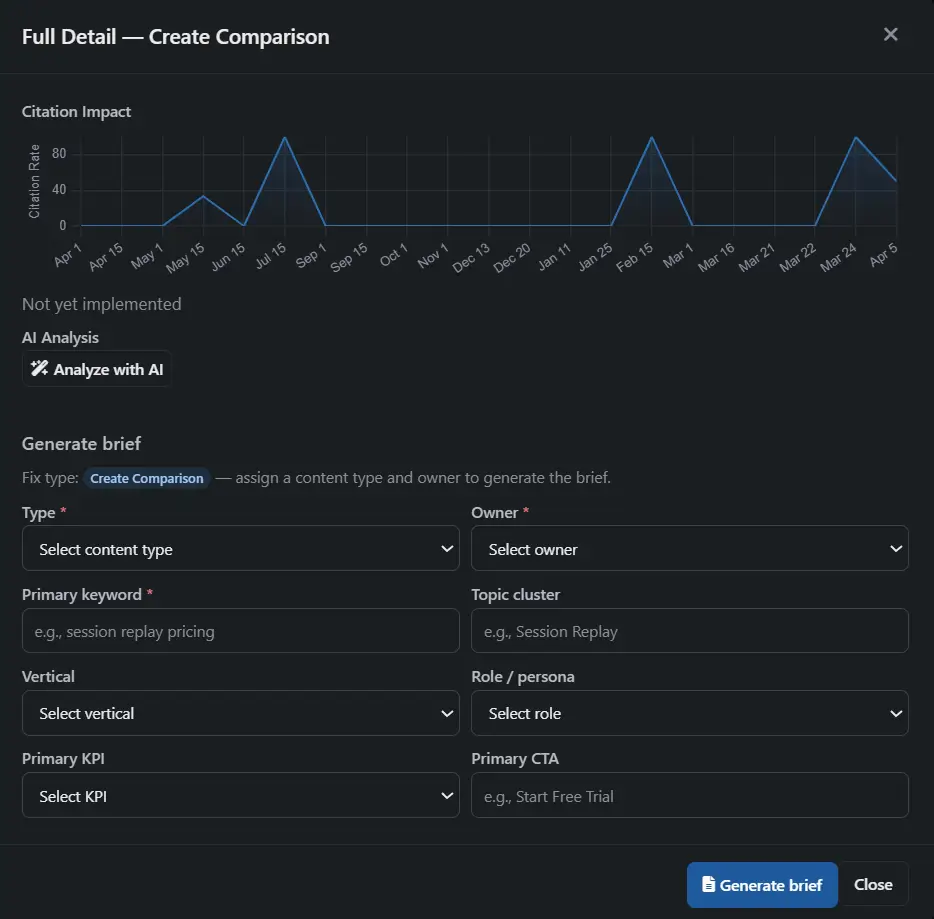
When Rankwize diagnoses why a prompt doesn't cite you, it can turn that gap into a structured content brief — the gap analysis, the recommended angle, the supporting queries, and the exact prompts and runs behind it. It's the plan a writer needs to create or fix the page, assembled from your own data instead of a blank doc.
Available on Pro + Diagnose and above
The plan, not the draft.
A brief sits upstream of the writing. It's the artifact you hand to whoever creates the page — a freelancer, an in-house writer, or the AEO Editor. It doesn't write the content; it tells the writer exactly what the content has to do to win the citation back.
That keeps two jobs separate and clear: diagnosis becomes a brief, and the brief becomes a draft. You always know whether you're planning a fix or writing one.
Diagnose
A recommendation names the gap, the fix type, and the prompts at stake.
Brief
The gap becomes an executable plan — the angle and context a writer needs.
Draft
The plan becomes a page — written or updated, then re-measured for lift.
What's in every brief.
Every brief is built from your account — your diagnosed gaps, your tracked prompts, your monitoring runs. The structured fields are assembled from real data; the analyst layer adds the reasoning and the angle on top.
Gap analysis
What's missing or weak about your current content for the prompt — the diagnosed reason you're not being cited, carried straight from the recommendation.
Recommended angle
The strategic direction for creating or updating the page, so the writer knows the story to tell — not just the keyword to hit.
Supporting queries
Related prompts the page should also answer, so one piece of content earns citations across a cluster of intents instead of one.
Linked prompts and runs
The exact monitoring data that informed the brief — the tracked prompts, their platforms, and business value — so every instruction traces back to evidence.
Two ways to generate one.
From a recommendation
Working a recommendation and ready to act? Click Generate Brief on it. The gap, fix type, and linked prompts are already there — the brief carries them through.
From the Content screen
Move a content item's status to Briefing and the pipeline generates a brief for it automatically — useful when you're planning work page-by-page.
A gate, so briefs are never half-baked.
Before a brief generates, Rankwize checks that it has everything it needs. A brief built on missing fields or no linked prompt would send a writer in the wrong direction — so the gate holds it instead.
If a check fails, you get a gate-failure banner on the content detail screen spelling out exactly what to fix. Resolve it, and the brief generates on the next pass — no silent failures, no half-baked output.
The gate checks that:
- ✓ The content item is in the Briefing stage
- ✓ Required fields are filled in — type, owner, fix type, plus KPI and CTA for existing pages
- ✓ At least one tracked prompt is linked to the page
- ✓ No brief already exists for that page and fix type
Structured JSON
Each brief exports as JSON on a versioned contract — predictable fields a writer, a doc, or a downstream tool can all read.
Brief history
Every content item keeps the full set of briefs generated for it, ready to re-download or compare.
One source of truth per fix
Each page-and-fix-type pairing has a single canonical brief, so the team is never working from conflicting plans.
Download it. Hand it off.
Briefs are saved as structured JSON exports, downloadable straight from the content detail panel. Hand one to a writer, drop it into your CMS workflow, or feed it to a tool that reads the contract.
Because every brief is versioned and kept in the page's history, you can always trace what a piece of content was supposed to do — and why.
Available on Pro + Diagnose and above
Brief generation is part of the Diagnose add-on, starting at $99/mo. It's generated as part of the diagnosis pipeline — drawn from your monthly brief allowance, not billed as separate AI credits. That allowance scales with your plan: 20 briefs a month on Pro + Diagnose, 100 on Business + Diagnose, and 250 on Scale + Diagnose.
Frequently asked
What plan do I need to generate briefs?
Brief generation is part of the Diagnose add-on — available on Pro + Diagnose ($99/mo) and above. Your monthly brief allowance scales with the plan: 20 briefs on Pro + Diagnose, 100 on Business + Diagnose, and 250 on Scale + Diagnose.
How is a brief different from the AEO Editor?
A brief is the plan; the AEO Editor is where the writing happens. The brief is the planning artifact you hand to a writer — it captures the gap, the angle, and the supporting context. The Editor is the downstream surface where that brief becomes a draft. The flow is: diagnose the gap, generate the brief, then write or update the page.
What format is a brief delivered in?
Each brief is a structured JSON export following a versioned contract, downloadable from the content detail panel. Every content item keeps a full history of the briefs generated for it, so you can re-download or compare past versions.
What happens if a brief won't generate?
Rankwize runs a quality gate before generating. If a required field is missing, the page has no linked prompt, or a brief already exists for that page and fix type, generation is held and a gate-failure banner on the content detail screen tells you exactly what to fix. Resolve it and the brief generates on the next pass.
Does generating a brief cost extra AI credits?
No. Brief generation runs as part of the diagnosis pipeline and draws on your plan’s monthly brief allowance — it is not billed as separate AI credits.
Can I have more than one brief for a page?
Yes — one per fix type. A single page can carry briefs for different fix types (for example, Add Evidence and Update Existing), and each is tracked separately in the page’s brief history. The gate just prevents generating a duplicate brief for the same page and fix type.
A brief is the bridge between a diagnosis and a draft in the AEO Editor.